Configuring content-type inboxing for the Native File System (AS2 only)
The Add Content-Type Directory to Inbox checkbox allows for sorting of incoming messages based on the content-type of the message to a subdirectory (under the Inbox specified on the General tab for the Host). You specify each of the content-types that you want directed to specified subdirectories by entering a name in the Directory field. Directory entries may be made for content-types of: EDIFACT, X12, XML, Binary, Plain Text, and Other (a default catch-all for messages with all other content-types you may receive.) The same subdirectory may be used for multiple content-types. You may also leave 'Directory' entries blank which will cause any received messages for that specific 'Content-Type' to be stored in the Inbox specified on the General tab.
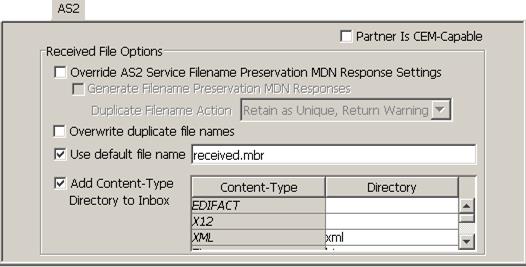
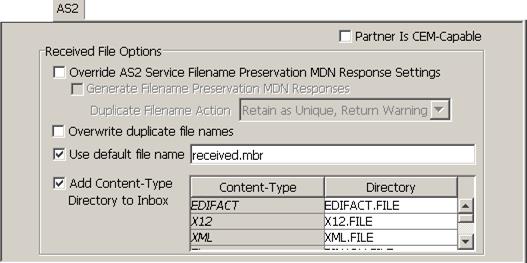
By default, the Content-Type directories are preconfigured for windows or IFS based folders. To use this feature on the AS/400 Native File System, modifications must be made to all directories that will be used so that the settings have the correct AS/400 syntax, i.e., each setting must be in the form DIRECTORY.FILE, for example:
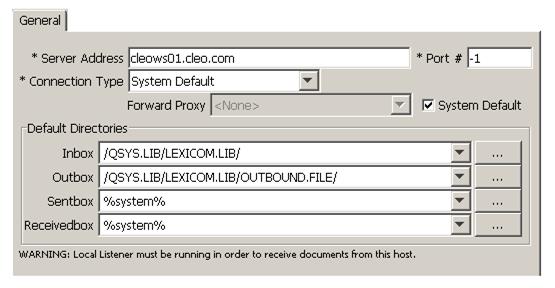
On the 'General' tab, specify just the library for the "Inbox" value where the "Content-Type" files will be created. In this example, we have used /QSYS.LIB/LEXICOM.LIB/:
Now verify that all the "directories" that you have specified, i.e., files in the form DIRECTORY.FILE, have a matching physical file defined. In the example above, the files EDIFACT.FILE, X12.FILE and XML.FILE under the /QSYS.LIB/LEXICOM.LIB library are being used. If these files don't already exist, create a physical file for each of the files you have specified as follows:
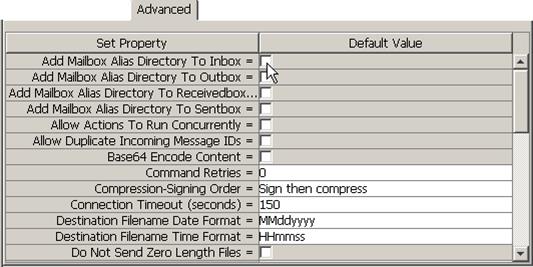
CRTPF FILE(LEXICOM/EDIFACT) RCDLEN(132) MAXMBRS(*NOMAX) SIZE(*NOMAX)CRTPF FILE(LEXICOM/X12) RCDLEN(132) MAXMBRS(*NOMAX) SIZE(*NOMAX)CRTPF FILE(LEXICOM/XML) RCDLEN(132) MAXMBRS(*NOMAX) SIZE(*NOMAX)As a final step, verify that the Add Mailbox Alias Directory To Inbox setting on the Advanced panel is not selected: